Honeybook Crm Specs, Features, and Value: Is it worth the price tag?
Category: Electronics — Software & Tools
Introduction
HoneyBook positions itself as an all-in-one client management platform tailored to small businesses and creative entrepreneurs. Its core promise is to replace a patchwork of spreadsheets, email threads, contract PDFs, and manual invoicing with a single, cohesive workspace for leads, contracts, invoices, scheduling, and basic automation. The central question for many prospective buyers is practical: does HoneyBook’s functionality, user experience, and ecosystem justify its recurring cost compared with other tools and the time saved by consolidation?
This article evaluates HoneyBook’s technical specifications, day-to-day features, real-world use cases, strengths, and limitations. It aims to help photographers, event planners, designers, consultants, agencies, and service-based small businesses decide whether HoneyBook is the right CRM to invest in by explaining what buyers typically care about—usability, integrations, automation, payment handling, team collaboration, and return on investment.
Product specs and core architecture
HoneyBook is a cloud-based (SaaS) client management and workflow platform designed for service-based businesses. The product is delivered through a responsive web interface and companion mobile apps for iOS and Android. It combines CRM, proposals, contract e-signature, invoicing, payment processing, scheduling, and workflow automation into a single product offering.
- Deployment model: Cloud-hosted SaaS (browser + mobile apps)
- Primary platforms: Web (modern browsers), iOS app, Android app
- Core modules: Leads/Contacts, Projects, Proposals, Contracts (e-sign), Invoicing & Payments, Scheduling, Automated Workflows, Templates
- Integrations: Calendar sync (Google, Outlook), email, Zapier (for third-party connectivity), basic accounting exports, online payment processors (built-in processing gateway, ACH/credit card support)
- Security & compliance: Standard cloud security practices with payment processing compliance (PCI scope via hosted payments); tenant-separated accounts and role-based access controls for teams
- Customization: Template-driven branding (logo, colors), customizable contract/invoice templates, workflow triggers, and email content
- Reporting: Basic business reports (revenue, outstanding invoices, leads pipeline) and exportable CSVs for deeper analysis
Detailed product review and analysis
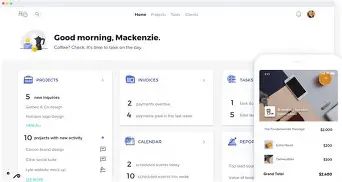
At a functional level, HoneyBook seeks to remove friction in the client lifecycle: from inquiry to signed contract to paid final invoice. The experience centers around “projects” (or jobs) that bundle contact records, messages, proposals, contracts, invoices, and timeline items. This structure mirrors how creative professionals manage discrete client engagements, making the model intuitive for those who sell time, services, or event-based deliverables.
CRM and lead intake
HoneyBook’s CRM stores contact details, conversation history, lead source, and project status. Lead intake can be automated through embeddable inquiry forms or a simple lead capture link. For small teams that rely heavily on social media and email inquiries, having a centralized record reduces lost leads. The platform’s pipeline view is focused and lightweight: it’s not a feature-rich sales CRM built for enterprise, but it is well-suited for freelancers who want visual status tracking without heavy configuration.
Proposals, contracts, and e-signature
Where HoneyBook stands out is its proposal and contract flow. Users can assemble a proposal that combines itemized services, optional add-ons, terms, and an electronic signature panel. The document flow is polished for the end client: the recipient can review line items, accept terms, sign, and pay within a single session. This reduces friction and shortens the sales-to-revenue timeline—an important advantage for businesses with high seasonal demand like weddings or conferences.
Invoicing and payments
Payments can be collected via card or ACH (where supported) via HoneyBook’s integrated processing. Invoicing ties directly to proposals and contracts so that accepted proposals can automatically generate invoices or payment schedules. For buyers, two levers matter: payment processing fees and reconciliation. HoneyBook handles the basics (automatic payment capture, partial deposits, scheduled payment plans), and exports make bookkeeping manageable. Businesses with complex accounting requirements may still want an external accounting product in parallel.
Shop the latest Electronics picks on Amazon.
Shop Amazon →Scheduling and calendar
Built-in scheduling tools let clients book time based on availability and preconfigured event types. Calendar sync with Google or Outlook ensures bookings avoid double-booking. While the scheduling features are capable, buyers looking for very advanced appointment logic (multi-person scheduling, round-robin assignment at enterprise scale) may find the functionality intentionally streamlined for small teams.
Automations and workflows
HoneyBook includes workflow automation to trigger emails, status changes, invoice generation, and internal reminders. These automations save time for repetitive tasks—sending reminder emails before an event, triggering invoice follow-ups, or kicking off onboarding steps. The automation editor is typically rule-based rather than scriptable, which fits the target user base: processes that are consistent and linear rather than highly conditional logic that larger businesses might require.
Integrations and ecosystem
HoneyBook provides built-in integrations for calendar apps, email, and basic accounting export. Zapier support broadens connectivity to CRMs, marketing tools, and niche apps. Buyers who need deep accounting integrations (full QuickBooks Desktop sync, automated class mapping) or advanced marketing automation might need additional middleware. That said, the platform’s integration scope covers the common needs of solo professionals and small studios.
Team collaboration and permissions
For small teams, HoneyBook offers multiple seats with role-oriented access. Collaboration centers on shared projects and internal notes. The product is designed to scale from single-owner workflows to small studios with several freelancers or employees. Larger agencies that require fine-grained permissions, audit logs across hundreds of seats, or multi-entity accounting may find the model less adaptable.
Mobile experience
The mobile apps are designed for on-the-go tasks: sending proposals, collecting a signature onsite, checking project status, or issuing quick invoices. Mobile UX priorities favor speed and essential functionality over the full feature set of the desktop web app—appropriate for field-based professionals such as photographers or event coordinators.
Usability and onboarding
Usability is a frequently cited strength. Templates, guided on-boarding, and prebuilt content for common service types reduce time-to-live. Buyers appreciate that one can set up a basic workflow and be operational within a couple of days. Where the product requires more thought is when migrating legacy client data or complex pricing structures: bulk imports exist, but data hygiene can be time-consuming.
Pros & Cons
Pros
- All-in-one platform that reduces the need for multiple apps and manual handoffs
- Streamlined client-facing documents — proposals, contracts, and payments in a single flow
- Intuitive interface with templates that speed onboarding for non-technical users
- Good fit for service-based small businesses (photographers, planners, creatives)
- Mobile apps support in-person signings and last-minute invoicing
- Workflow automations that reduce repetitive admin work
- Calendar sync and scheduling reduce double-booking headaches
Cons
- Not as customizable or extensible as enterprise CRMs — advanced reporting and scripting are limited
- Integration depth can be shallow for specialized accounting or marketing workflows
- Payment processing fees and gateway choices are controlled by the platform—buyers should factor fees into pricing
- Transitioning existing clients and historical invoices can be time-consuming
- Large teams or agencies with complex permissions may find the role model restrictive
How HoneyBook compares to alternatives
A single comparison table helps prospective buyers quickly assess fit relative to common alternatives in the market.
Discover deals on Electronics — updated daily.
View Offers →| Feature / Product | HoneyBook | Dubsado | 17hats | Bonsai |
|---|---|---|---|---|
| Best for | Creative freelancers and small studios | Custom workflows and brand-heavy businesses | Solo entrepreneurs who want simplicity | Freelancers and consultants with contracts + bookkeeping needs |
| Ease of use | High — polished onboarding and templates | Medium — flexible but steeper learning curve | High — straightforward UI | High — focused on contract/invoice flows |
| Automations | Good — rule-based workflows | Very good — more conditional logic options | Basic — workflow functionality exists but limited | Basic to medium — focused on proposals and payments |
| Payments & invoicing | Integrated gateway, payment plans | Integrated + third-party gateway options | Integrated gateway, simple invoicing | Integrated, strong contract templates |
| Integrations | Moderate — Zapier expands reach | Strong — Zapier + native integrations | Moderate — covers essentials | Moderate — API and Zapier |
| Team features | Good for small teams | Good — more advanced team workflows | Best for solo or small teams | Good for freelancers; limited multi-user depth |
| Reporting | Basic to moderate | Moderate — customizable reports | Basic | Basic |
Buying guide: how to decide if HoneyBook is right for you
Choosing the right CRM/business operations platform depends on the specifics of the business model, existing toolset, technical comfort, and growth plans. The following guide helps weigh the most important considerations.
1. Match the product to the business workflow
- Service model fit: HoneyBook is optimized for project-based, event-driven, or one-off service engagements. If a business sells recurring product subscriptions or needs complex service bundling, verify that HoneyBook’s itemization and invoicing meet requirements.
- Client experience: If the buyer values a single streamlined client experience—receive proposal, sign contract, and pay without leaving the page—HoneyBook delivers strong value.
2. Assess integrations and accounting needs
- List critical integrations (calendar, email marketing, CRM, accounting) and validate whether HoneyBook has native support or if Zapier is acceptable as middleware.
- For businesses with sophisticated accounting needs—multi-class tracking, automated reconciliation—confirm export formats and whether the existing accounting stack can absorb HoneyBook’s data cleanly.
3. Consider team size and permissions
- Small teams and solo operators will generally find the platform’s permission model adequate.
- Larger teams should verify seat-based pricing, role granularity, and activity logging before committing.
4. Evaluate automation and time savings
- Document current repetitive tasks (email follow-ups, reminders, onboarding steps) and map which ones HoneyBook can automate.
- Estimate hours saved per week and multiply by labor cost to gauge return on investment. Even modest weekly savings can justify a subscription in many service businesses.
5. Try before buying and plan migration
- Use the trial period to onboard a sample project end-to-end: create a lead, send a proposal, collect a signature, and accept a payment. This reveals UX gaps and integration friction.
- Plan data migration—export historical client lists and invoices as CSVs and clean them before importing. Migration effort is an often overlooked cost.
6. Factor in payment processing and fees
- Payment fees reduce margins on small-ticket items; understand whether HoneyBook’s processing fees and payout timing fit cashflow needs.
- If the business regularly accepts large payments, validate ACH availability and limits.
7. Think about brand control and client-facing templates
- HoneyBook supports logo and color customization; evaluate whether the level of branding control reflects the brand’s expectations for client-facing materials.
Real-world use cases and buyer considerations
Several buyer archetypes illustrate how HoneyBook fits into operational workflows:
- Wedding photographer: Needs rapid proposal acceptance during a consultation, deposits and payment plans, automated pre-wedding reminders, and a clean contract with liability terms. HoneyBook’s proposal-to-payment flow reduces friction and shortens time-to-deposit.
- Event planner: Manages multiple vendors and milestone payments. HoneyBook centralizes client communication and provides a timeline view; however, planners who need vendor-accessed sub-accounts might need additional tooling.
- Freelance designer: Values proposal templates, invoicing, and tax-report-ready exports. For solo operators, the integrated workflow reduces the need to stitch together several apps.
- Small creative agency: Requires team seats, handoffs, and role-based access. HoneyBook supports small teams well but agencies should evaluate whether deeper project management features or advanced reporting will be needed.
Conclusion
HoneyBook offers a focused, polished solution for service-based small businesses that want to streamline client onboarding, contract signing, and payments without building a custom stack. Its strength is the client-facing flow—proposals, contracts, and payments presented in a single, branded experience—which often yields measurable reductions in administrative time and faster payment cycles. For photographers, event professionals, consultants, and solo creatives, that alone can make the platform worth the subscription.
However, the decision hinges on two practical concerns: integration depth and long-term scale. Businesses with complex accounting needs, advanced reporting requirements, or enterprise-grade permission and workflow demands may find HoneyBook intentionally lightweight. Similarly, buyers should account for payment processing fees and data migration effort when calculating total cost of ownership.
In short, HoneyBook is worth evaluating if the buyer’s primary goals are to reduce administrative overhead, deliver a professional client experience, and consolidate proposals, contracts, and payments into a single workflow. Prospective customers should use a trial period to validate critical integrations, test the end-to-end client journey, and quantify expected time savings before committing. For the intended audience—small, client-focused service businesses—HoneyBook often delivers strong value; for larger or more specialized operations, it may serve best as one component among other specialized tools.